
Download Receiptron – Personal Finance Management, Receipt Tracker, Free Web App
Overview – What is Receiptron and Who Is It For?
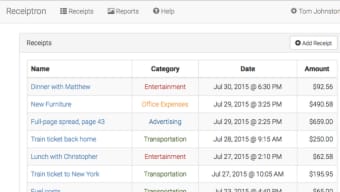
Receiptron is a full‑version web application designed to simplify personal finance management by turning paper receipts into searchable, searchable digital records. Launched on Softonic on July 19 th 2017, the platform targets anyone who wants to keep track of daily expenses without the hassle of manual spreadsheets or bulky accounting software. Its primary promise is to let users capture, store, and categorize receipts directly from a browser, making the process as seamless as scanning a document with a smartphone camera. Because it runs entirely in the cloud, there’s no need to install heavyweight desktop programs; a modern web browser is all that’s required.
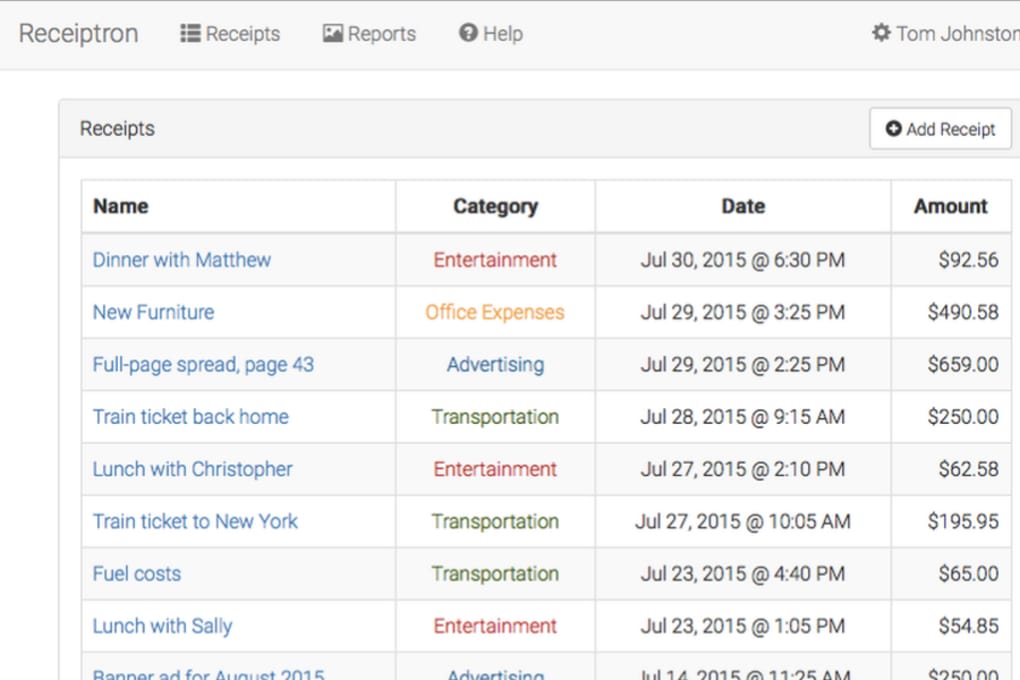
The interface is built in clean, English‑only language, which helps reduce learning curves for users who are not tech‑savvy. Whether you are a freelancer juggling multiple client invoices, a small‑business owner monitoring cash flow, or a household manager trying to stay on top of grocery and utility bills, Receiptron provides a centralized hub where every expense is logged with a timestamp, category, and optional notes. The tool also supports basic reporting, enabling users to generate month‑by‑month summaries that can be exported for tax preparation or budgeting purposes.
Security is a core concern for any finance‑related service. Receiptron encrypts data in transit using HTTPS and stores receipts on secure servers that comply with industry‑standard data protection policies. Regular updates are pushed automatically, ensuring that the latest security patches and feature enhancements are always available without user intervention. In short, Receiptron blends the convenience of a web‑based receipt scanner with the robustness of a dedicated finance manager, all while remaining free to download and use.
Key Features That Set Receiptron Apart
- Instant Receipt Capture – Upload images or PDFs directly from a browser, with automatic OCR (optical character recognition) that extracts dates, totals, and merchant names.
- Smart Categorization – AI‑driven tagging assigns each receipt to predefined categories such as “Food & Drink,” “Travel,” “Utilities,” or custom tags you create.
- Searchable Archive – Full‑text search across all uploaded receipts, allowing you to locate a specific transaction in seconds.
- Monthly & Custom Reports – Generate visual expense reports, export CSV files, and download PDF summaries for personal records or accountant review.
- Multi‑Device Sync – Because the app lives in the cloud, your receipt database updates instantly across any device—desktop, laptop, tablet, or phone.
- Secure Data Handling – End‑to‑end encryption, regular backups, and compliance with GDPR‑style privacy standards protect your financial information.
- Integration Ready – Simple API endpoints let you connect Receiptron with other personal finance tools, such as budgeting apps or accounting software.
- Free Core Version – The full version is available at no cost, with optional premium add‑ons for advanced analytics and team collaboration.
Installation, Setup & Compatibility – Getting Started in Minutes
Since Receiptron is a web‑based solution, there is no traditional “installation” process. Users simply need a supported browser and an internet connection. The application works flawlessly on the most popular browsers, including Internet Explorer, Firefox, Opera, Safari, and Chrome. This broad compatibility ensures that whether you are on a Windows PC, a macOS laptop, or even a Linux workstation, you can access Receiptron without additional plugins or extensions.
To begin, visit the official Receiptron homepage and click the “Sign Up – Free” button. The registration form asks for a valid email address, a strong password, and an optional two‑factor authentication (2FA) setup for added security. After confirming your email, you are taken to the dashboard where the “Add Receipt” button is prominently displayed.
Drag‑and‑drop your scanned receipt or click to browse files from your local drive. The OCR engine starts processing within seconds, populating the form fields with detected data. You can then edit any information, assign categories, and add notes before saving.
For mobile users, Receiptron offers a responsive design that adapts to smaller screens, allowing you to capture receipts on the go using a smartphone camera. While there is no dedicated native app, the web interface provides a “Share to Receiptron” button that integrates with the device’s native sharing menu, making the upload process virtually frictionless.
Operating System Compatibility (itemprop="operatingSystem"): Receiptron runs on any operating system that supports a modern web browser—Windows 10/11, macOS 10.15+, Linux distributions with up‑to‑date browsers, as well as iOS and Android devices via mobile browsers. The only limitation is that the interface is English‑only, which may affect non‑English speakers.
Because the platform updates automatically on the server side, users never need to download patches or worry about version mismatches. All new features, security fixes, and performance improvements are applied instantly, ensuring a consistently smooth experience across all devices.
Pros and Cons – A Balanced Look at Receiptron
Pros
- Completely web‑based – no software download or installation required.
- Robust OCR that reduces manual data entry.
- Free core version with optional premium upgrades.
- Cross‑browser compatibility (IE, FF, Opera, Safari, Chrome).
- Secure, encrypted data storage with regular backups.
- Easy export of reports in CSV and PDF formats.
- Responsive design works well on desktops, tablets, and smartphones.
Cons
- Interface limited to English, which may deter non‑English users.
- No dedicated native mobile apps – relies on browser responsiveness.
- Advanced analytics and team collaboration require paid add‑ons.
- Limited offline capability; requires internet connection for full functionality.
- Some older browsers (e.g., legacy Internet Explorer versions) may experience slower OCR processing.
Frequently Asked Questions (FAQ)
Is Receiptron really free to use?
Yes, the core version of Receiptron is completely free. Users can capture, store, and generate basic reports without paying a cent. Premium features such as advanced analytics, multi‑user collaboration, and priority support are offered as optional paid add‑ons.
How secure is my financial data on Receiptron?
Receiptron uses HTTPS for all data transmission and stores receipts on encrypted servers that comply with GDPR‑like privacy standards. Regular backups and automated security patches further protect your information. Users can also enable two‑factor authentication for added account security.
Can I use Receiptron on my mobile phone?
Absolutely. Although there is no native iOS or Android app, the web interface is fully responsive. You can open Receiptron in Safari, Chrome, or any modern mobile browser, capture receipts using your device’s camera, and upload them directly.
What browsers are supported?
Receiptron works on Internet Explorer, Firefox, Opera, Safari, and Chrome. For the best experience, use the latest version of any of these browsers to ensure full OCR functionality and fast loading times.
Can I export my receipt data for tax purposes?
Yes. Receiptron provides export options in CSV and PDF formats. You can generate monthly or custom‑date range reports and download them for submission to accountants or for personal tax filing.
Conclusion – Should You Download Receiptron Today?
Receiptron delivers a compelling blend of convenience, security, and cross‑platform accessibility that makes it a strong contender in the personal finance management space. Its free core offering is generous enough for most individual users, while the optional premium modules cater to power users and small teams. The web‑only delivery model eliminates the friction of traditional software installs and ensures that updates are seamless and automatic.
If you’re tired of juggling paper receipts, spreadsheets, or expensive accounting suites, Receiptron provides a straightforward, secure, and cost‑effective alternative. The only notable drawbacks are the English‑only interface and the lack of dedicated mobile apps, but the responsive design mitigates the latter for most everyday tasks.
Ready to get organized? Download Receiptron now and start turning your cluttered receipts into a clean, searchable digital ledger. Join the growing community of users who have already streamlined their expense tracking and enjoy the peace of mind that comes with secure, cloud‑based finance management.



.png)



